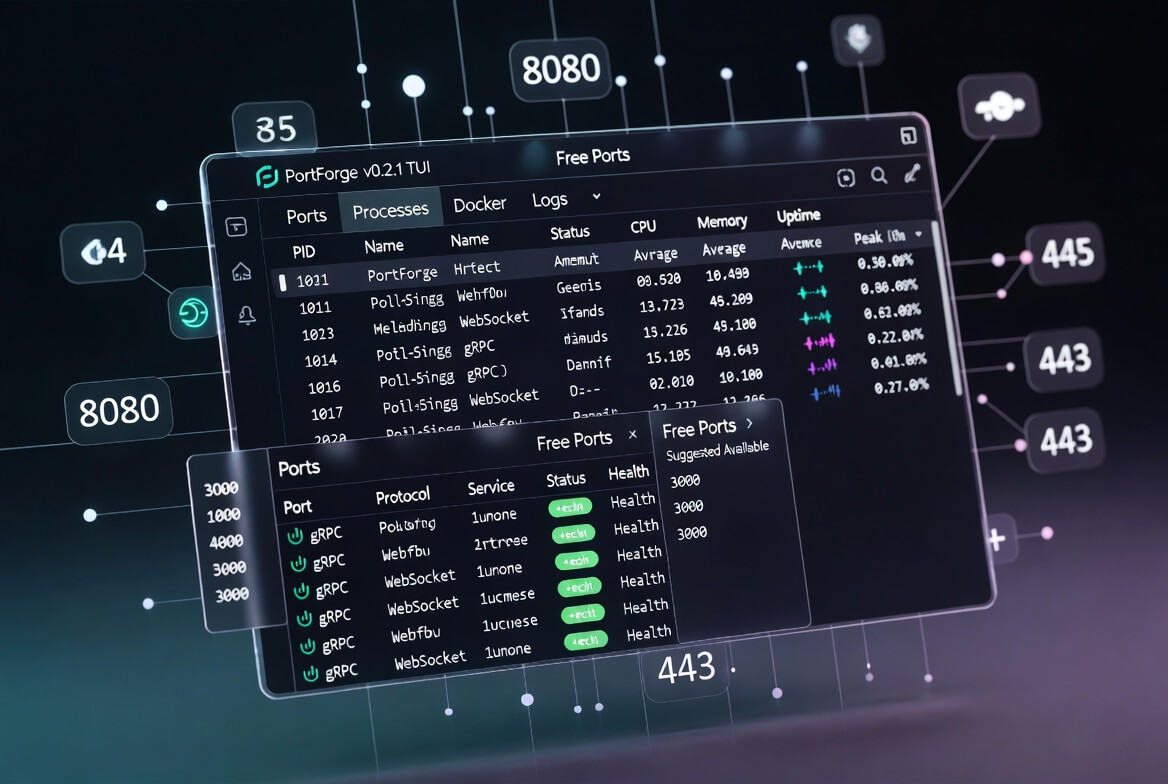
When PortForge first appeared, it set out to replace the blunt instruments of port inspection with genuine engineering context. Version 0.2.1 builds directly on that foundation. Released today, it introduces tools that anticipate problems before they arise, surface performance trends that were previously invisible, and refines the terminal experience so that navigation feels natural rather than mechanical. The result is a tool that not only tells you what is listening on a port, but helps you plan, diagnose, and control your local development environment with greater confidence.
Proactive Port Management: Finding Free Ports Before Conflict Arises
One of the most common interruptions in local development is the hunt for an available port. Microservices, multiple instances of the same application, or side projects can quickly exhaust the familiar ranges. The new portforge free <start> command changes that. Supply a starting port and, if desired, a --count flag, and PortForge scans forward to identify the next available ports. It respects your existing configuration and respects the same context-aware logic that powers the main inspector.
This small addition brings foresight to what was once guesswork. No more cycling through 3000, 3001, 8080 and hoping for the best. It is the kind of quiet productivity win that engineers notice immediately and appreciate daily.
Diagnosing Conflicts with Clarity and Suggested Remedies
Port conflicts remain a perennial source of friction. The new portforge conflicts command surfaces every port where multiple processes are listening and offers practical resolution paths. It evaluates raw listeners before any deduplication step, ensuring accuracy even in complex setups involving tunnels or overlapping services. For each conflict it suggests next actions: terminate a zombie process, switch branches, or reconfigure a container.
In practice this turns a five-minute detective story into a thirty-second decision. The command respects the same safety-first philosophy established in the initial release: dry-run previews are available, and nothing is killed without explicit confirmation.
Health Checks That Reach Further: gRPC and WebSocket Support
Modern services rarely speak plain HTTP alone. The v0.2.1 release extends health intelligence to gRPC and WebSocket endpoints through lightweight TCP connection-based checks. Developers can now prefix health endpoints in configuration with grpc:, grpc://, ws:, ws://, or websocket:. The scan pipeline automatically selects the appropriate probe.
This expansion keeps PortForge relevant as architectures evolve beyond traditional REST. Whether verifying a gRPC microservice or confirming a real-time WebSocket connection, the tool now provides the same trustworthy “healthy or not” signal that users have come to rely on for HTTP services.
Visualising Resource Trends: History, Sparklines, and Performance Context
A single snapshot of CPU or memory usage can mislead. The new process resource history feature records metrics at one-second intervals and displays them as sparklines in both the port detail view and the dedicated Processes tab. Average and peak values sit alongside the graph, giving immediate visual context.
As Peter Drucker observed, what gets measured gets managed. With these sparklines an engineer can spot a slowly climbing memory leak or a process that spikes only under load; insights that were previously buried in logs or monitoring dashboards. The data remains lightweight, stored only for the lifetime of the TUI session, preserving the tool’s characteristically small footprint.
A Terminal That Adapts to You: Tabs, Themes, and Mouse Support
The most visible change is the new tab bar separating the header from the content area. Four views are now available at a keystroke:
- Ports - the familiar context-rich table
- Processes - sorted by CPU usage, with sparklines for quick scanning
- Docker - containers only, complete with image and status details
- Logs - a live activity stream showing scans, theme changes, tab switches, and actions in real time
Navigation between tabs uses the Tab and Shift+Tab keys, exactly as one would expect. Five built-in colour themes; dark (default), light, solarised, nord, and dracula; can be cycled with the T key. The TUI architecture has been refactored to support dynamic switching without restarting the application.
Mouse support arrives for those who prefer pointing and scrolling. Click to select rows, use the scroll wheel to navigate large tables, and toggle the mode with the m key. Scrolling has also been improved so that large result sets remain accurate and responsive.
These refinements do not add complexity; they remove friction. The interface now feels responsive to both keyboard purists and mouse users alike.
Under the Hood: Stability and Future-Proofing
Alongside the headline features, the release includes important architectural improvements. The theme system is now instance-based rather than static, conflict detection logic has been corrected for raw listeners, and resource sampling enforces a consistent one-second interval. Tunnel detection now correctly identifies Tailscale Funnel endpoints, closing a small but notable gap.
Every change was made with the same guiding principle that shaped the original project: deliver meaningful context without sacrificing speed or simplicity.
Context That Keeps Evolving
PortForge was never intended to be a static utility. Each release refines the lens through which developers see their local environment. Version 0.2.1 adds foresight, visual clarity, and ergonomic polish while preserving the lean, context-rich core that made the tool valuable from day one.
The journey continues. The roadmap already points toward richer scripting capabilities, expanded framework detection, and deeper integration with container orchestration. Yet the mission remains unchanged: turn opaque system information into actionable engineering insight so that developers can spend less time managing ports and more time building what matters.
Try the new release with cargo install portforge or grab the latest binary from the GitHub releases page. Feedback, feature requests, and contributions are warmly welcomed at github.com/kabudu/portforge. The more voices that shape it, the more useful PortForge becomes for the entire community.